I (25 pts) Create and work with a small database
- Review the
DB Build Video from class
- This video introduced an
'accelerated reader' system with the following data
model
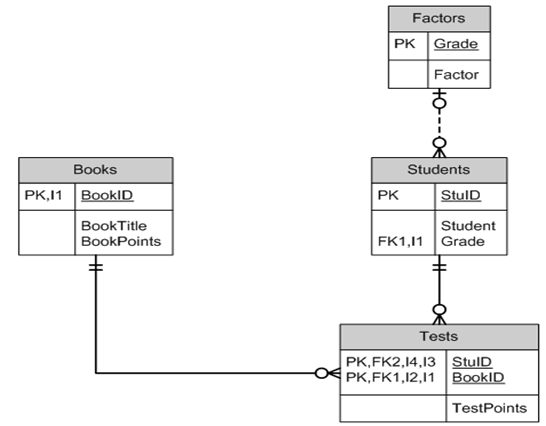
and the following data in third normal form
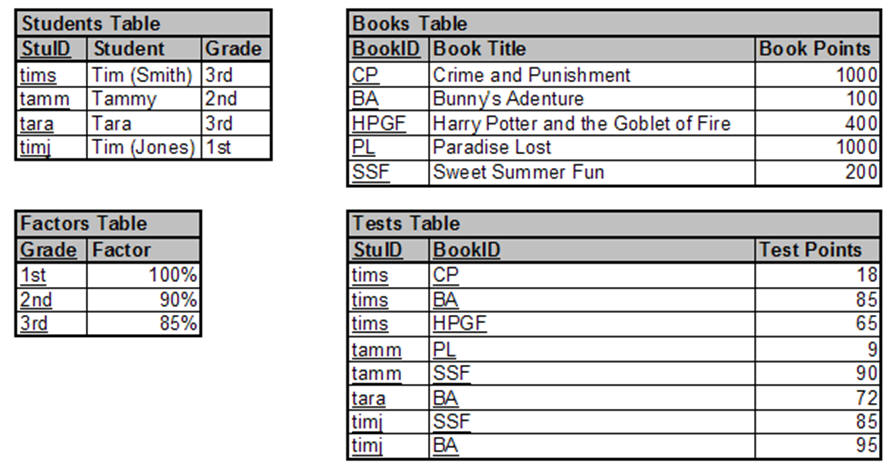
- Create an Access database named AccRdr.accdb
which implements this data model (tables, columns,
and relationships).
- Populate your database with the sample data but
in addition
- Add a 13th grade to the Factors table with a
factor of 25%;
- Add yourself to the Students table (make up
a unique StuID and you are in the 13th grade);
- Add a book you like to the Books table (make
up a book id and its points are equal to 1000
plus the last 3 digits of your 927 number);
- Add a test which you took on the book you
added. Your TestPoints were the 5th & 6th digits
of your 927 number.
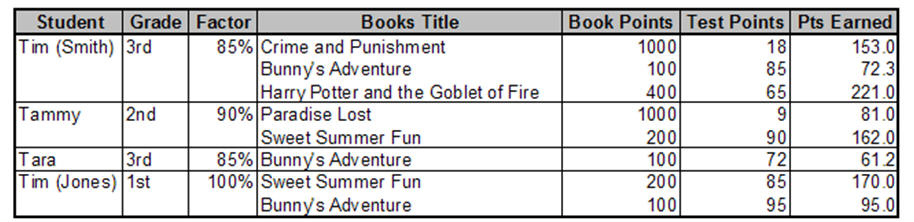
- Create a query named AllTests which reproduces
the information (though not the format) of the
following slide from the walkthru (i.e., list all
students, their grade, the grade factor, books they
have tested on, the book points, the test points,
and the points earned).
- Beyond the video: Create a
query named BooksByGrade which lists Grade and any
Books (by titles) read by a student in that grade
(presumably for a report showing what has been read
by grade).
- Beyond the video: Create a
query named StudentSummary which shows each student
(who has taken at least one test) and the total Pts
Earned by that student. Hint: Use the AllTests query
as input, keep only the Student and Pts Earned
columns, and make it a summary query where you Group
By Student and Sum Pts Earned.
- Attach the completed AccRdr.accdb database to
this assignment for grading (note that one
consolidated database from both I & II should be
prepared).
II (25 pts) Develop basic database forms and
reports
- Continue with the AccRdr.accdb created in item I
above in which you created an 'accelerated reader'
database from a data model.
- Create a form named frmBooks which allows entry,
update, & delete of information in the Books table.
- Create a form named frmStudents which allows
entry, update, & delete of information in the
Students table.
- Create a form named frmStudentTests which shows
each student and, for each student, a list of the
books on which they have been tested.
- Create a report named rptStudentTotals which has
a group for each student. The group header should
show student information and within the group should
be a list of the books they have read including the
Pts Earned for the book. At the end of the group
should be a sub-total of the total Pts Earned for
the student.
- Attach the completed AccRdr.accdb database to
this assignment for grading (note that one
consolidated database from both I & II should be
prepared)