myECONlaB Tips & TRicks
ECON2105 & ECON2106: Macro & Micro Economics
Professor Schmidt's ECON courses
***
WEBSITE LINKS


***
COURSE LINKS




Be Sure to Review Your Online Support Options for this Course!
Learning Aids:
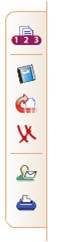
Tool Bar Example:
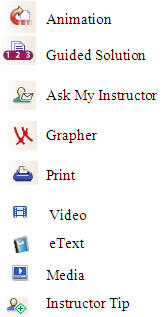
Click "Ask My Instructor"
- Send your instructor an email about the question on which you are working. The email includes:
- Your name
- The chapter on which you are working
- The number question you are working
- Your solutions thus far in the question
- Your typed note to the professor stating your issue or difficulty
Click "Guided Solution"
- To receive step-by-step guidance on how to solve the problem on which you are working. It is similar to a virtual tutor.
- Sometimes you must enter an answer in order to receive the next set of hints, instructions, or concept explanation.
Click "eText"
- Opens the online textbook to the page that deals with the type of question on which you are working.
Click "Grapher"
- Launches a blank graph allowing you to draw graphs to help you work out the answers to the question
Click "Video"
- Launches a Video clip that demonstrates how to solve a question like the one you are working on
Click "Print"
- Allows you to print the current question for future reference
NEED HELP?
Text the Professor @
706.680.N123
WORKING ONLINE?
Click the  icon and send
the professor a linked message.
icon and send
the professor a linked message.
Click the  icon and receive step
by step instructions on how to solve the problem.
icon and receive step
by step instructions on how to solve the problem.
The  icon indicates that this
question requires graphing.
icon indicates that this
question requires graphing.
Click the  icon and watch an
animated video of an instructor solve the graph or math
question.
icon and watch an
animated video of an instructor solve the graph or math
question.
Click the  icon and be
immediately directed to the page of the e-text discussing how to
solve this problem.
icon and be
immediately directed to the page of the e-text discussing how to
solve this problem.