FIRST WEEK OF CLASS

ECON2105 & ECON2106: Macro & Micro Economics

Professor Schmidt's ECON courses


Return to Course Home


Return to ECON Home


***

WEBSITE LINKS


Course Information


Scholarship/Research


Personal Happenings


Various Links


***

COURSE LINKS


Course Policies


Course Resources


Online Resources


Contact Info & Online Support


Contact Professor Schmidt with any Questions: BSCHMIDT@GRU.EDU or 706.680.6123 (text)

Prof Schmidt's Website: spots.gru.edu/bschmidt

Visit ECON Homepage for Detailed Course Information


STUDENT DROP/ADD PERIOD

(Day 1-2 or 3 of class)


STEP #1:

DETERMINE if this course is right for you and your schedule this semester.


CLICK to VIEW PROF. SCHMIDT'S

Required Resources Webpage

(Syllabus & Schedule)


CLICK to DOWNLOAD

First Week of Class Flyer

Required Resource Flyer

D2L NEWS POST - Welcome

ECON Online Syllabus

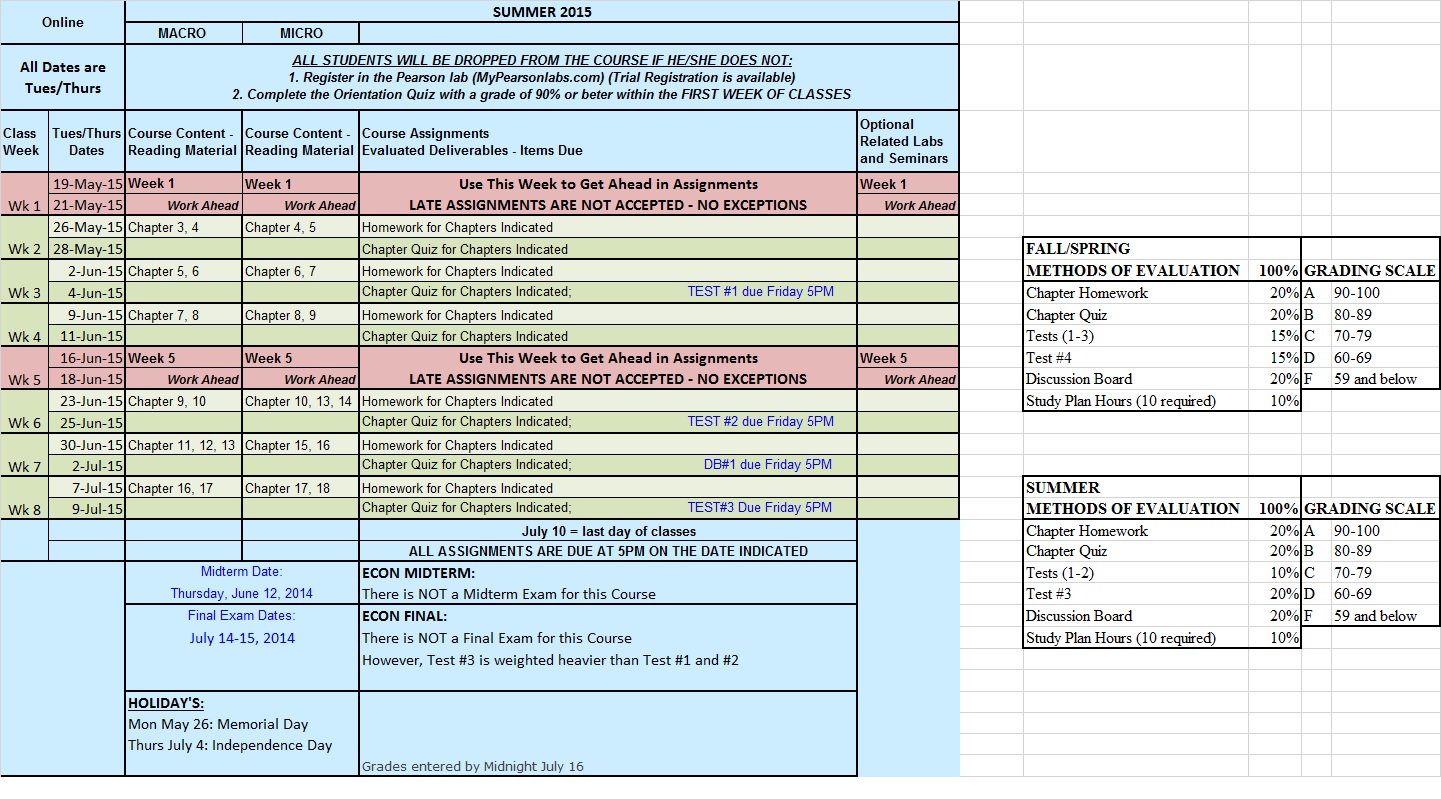
ECON Online Course Schedule


Be sure to:

  1. Check this webpage and/or D2L for Course Updates throughout the first week of class

  2. Review all course syllabus, schedule, policies and requirements and make an informed decision around drop/add

(Day 3 or 4 - 5 of class)

MORNING AFTER DROP/ADD PERIOD ENDS


STEP #2:

REGISTER in the Online Lab

AND

COMPLETE Syllabus Quiz


CLICK to VISIT

GRU's Attendance Policy

Lab Issues /  Pearson Contact


CLICK to DOWNLOAD

MyEconLab Getting Started Flyer


Students Must Check D2L News Posts for Course Code ID's and

Lab Registration Instructions


Be sure to:

  1. Register in the Lab AND

  2. Complete the Orientation/Syllabus Quiz (located inside the online lab)

*Complete Both Steps

Prior to the GRU

Attendance Drop Date

in order to prevent

being Dropped from the Course

for non-attendance.


**Use the 17 Day Free Trial Registration from Pearson if you have not received your Financial Aid or Texts.

(Day 5 or 6+)

SECOND WEEK and FORWARD


STEP #3:

BEGIN Course work


CLICK to VISIT

Online Lab (Pearson's MyITLab)

Locating and Beginning Assignments

How To Videos

ECON Home Page


CLICK to DOWNLOAD

Course Schedule/Grade Worksheet

*Review Course Resource Links on ECON Homepage!


Be sure to :

  1. Stay ahead of deadlines

  2. Use resources in the lab and on Prof Schmidt's website

  3. Contact Prof Schmidt with any questions

*Deadlines ARE the day assignments are to be completed.


**Deadlines ARE NOT the day to begin working on the assignment or to plan on doing the majority of the assignment.


FIRST WEEK FLYER

ECON: GETTING STARTED

  1. DECIDE: Is this course a good fit for your schedule this semester

  2. REGISTER and COMPLETE SYLLABUS QUIZ: Prevent being dropped for non-attendance

  3. BEGIN COURSE WORK: Stay ahead of deadlines and contact Professor anytime!

STUDENT EXPECTATIONS BY SEMESTER CALENDAR

DURING STUDENT DROP/ADD PERIOD:


  • Check Announcement in D2L News

  • Review Prof. Schmidt’s Website

    • Course Syllabus, Schedule, Policies, Assessments

    • Getting Started and Required Resource webpages

    • Online Course Prep Guide

  • Decide if you are remaining in the course for this semester

    • If NO: I hope to see you next semester

    • If YES:

      • Mark Calendar with due dates

      • Purchase Required Resources

      • Watch D2L for release of Course Code IDs

MORNING AFTER DROP/ADD PERIOD ENDS:


  • Check D2L News for Course Code ID and Pearson Online Lab Registration Instructions

  • Register in the Online Lab (Pearson’s MyECONLab)

  • Complete the syllabus quiz with a 90% or better and begin working on assignments

BEFORE

GRU ATTENDANCE DROP DATE (usually

5th – 7th day of semester):


*Greater Details and Drop Date Explanations are available on Professor’s Getting Started Webpage

***ANY STUDENT THAT HAS NOT ***

COMPLETED THE FOLLOWING TWO ITEMS

BY THE GRU ATTENDANCE DROP DATE

WILL BE DROPPED FROM THE COURSE BY THE REGISTRAR


(This course is taught every semester and the student will be encouraged to enroll the following semester but will not be added back this semester)

1.     REGISTERED IN THE LAB AND

2.     COMPLETED THE ORIENTATION/SYLLABUS QUIZ

 GRU Attendance Date is usually 5-7 days after the 1st day of classes

The exact Day and Time can be obtained from the Registrar

and will be released in D2L with the Course Code ID

8-Point Star: Need Explanation of GRU Drop Dates?


BE SURE TO KNOW......


REQUIRED RESOURCES

(Text books, Access Codes, etc.)


Click the Required Resource Webpage Link above for Details including Text Information

 It is highly recommended that students purchase the JagStore package for this course.

Several resources are required - be sure to review the website link above.


ATTENDANCE DROP

GRU DROP DATE EXPLANATIONS: 

GRU has two drop dates:

  1. The add/drop period for students (typically the first 2-3 days of classes) that allows students to adjust their schedule for the semester without a withdrawal showing on their transcript.

  2. The attendance drop date, (typically 5-7 days after the start of classes) which is determined by and used by the registrar to drop students from courses which they have not yet attendend. A withdrawal will appear on transcripts.

For Professor Schmidt:

  1. Students should review the course syllabus, schedule, policies, required resources, and other information on Professor Schmidt's website to determine whether to drop the course during the student drop/add period or to remain in the course for the semester.

Students choosing to remain in the course:

  1. will receive the Course Code ID and instructions for registration in the online lab via D2L the morning after the student drop/add period.

  2. are required to register in the online lab and complete an assignment before the attendance drop date to be counted as attending the course and prevent being withdrawn by the registrar due to non-attendance.

Students choosing to remain in the course that DO NOT Register in the Online Lab AND Complete an Assignment by the Attendance Drop date, will be dropped from the course by the registrar! These students will be encouraged to register for the course the following semester but will not be added back by the professor! See below for more details.


STUDENT EXPECTATIONS

DURING DROP/ADD PERIOD: 

  1. Check D2L for News updates and course information (Contact ITS in University Hall for D2L access issues)

  2. Read Course Syllabus, Review Course Schedule and Orientation file

  3. Explore Professor's Website for resources and course information

  4. Mark personal calendar with important course deadlines/events found on the Course Schedule

  5. Review the Assignment Map for a complete picture of assignments, textbooks, points, and deadlines of each module

  6. Plan and set aside weekly study time for modules. Be sure to allow 7-10 hours for each chapter/weekly content. While this course is an online course it is still a college course that requires time for lecture, study, homework, testing, and projects. Please review the Online Course Preparation Guide for more information.

*The Course Code ID along with instructions for registration in the Pearson Online Lab

will be posted in D2L the day following the end of the drop/add period.

(Drop/Add is the first 2-3 days of classes)


*Reminder: After Course Code ID's are released all future communication will take place within the lab.


STUDENT EXPECTATIONS

AFTER DROP/ADD - YET BEFORE the END of the FIRST WEEK of CLASSES: 

  1. MANDATORY Registration in Pearson Online Lab

Students will need the Course Code ID posted in D2L by the professor AND the Pearson Access Code included in the JagStore bundle (this code can also be purchased online at the time of registration).

  1. MANDATORY Completion of Orientation/Syllabus Quiz

Once registered in the Course area of the Pearson lab students must successfully complete the Orientation Quiz with the required score (90%) in order to release access to the course assignments.


***ANY STUDENT ***

THAT HAS NOT COMPLETED BOTH OF THE ABOVE STATED MANDATORY REQUIREMENTS

BY THE GRU ATTENDANCE DROP DATE

WILL BE DROPPED FROM THE COURSE FOR THE SEMESTER

(This course is taught every semester and the student will be encouraged to enroll the following semester)


**Please Note: Prof. Schmidt does not complete paperwork for students.

Therefore, if the registrar's office inadvertently does not drop a student whom also does not withdraw or complete course assignments that student WILL BE assigned the earned grade of 'F.'


STUDENT EXPECTATIONS

THROUGHOUT the REMAINDER of the SEMESTER:


AFTER registering the Pearson Lab and BEFORE beginning coursework Students should:

  1. Check Lab Announcements for Reminders/Important Information

  2. Run the Browser Tune-up within the lab (This configures and updates more than just the browser ensuring proper funcitoning of the lab software).

  3. Download free version of Google Chrome and/or FireFox - the receommended browsers. (Internet Explorer and Safari should not be used to run MyECONLab.)

  4. Be sure to review the Plan of Study, Concept Help, MyEconLab Errors, Course Policies, and Course Resource webpages.

  5. Begin preparing for and completing assignments


THROUGHOUT Semester Students are Responsible for:

  1. Checking Lab Announcements every 24 hours

  2. Staying ahead of all course deadlines - assignments are not accepted late

  3. Contacting the professor at the first sign of difficulty

  4. All Course Policies

  5. Reviewing all available resources on this website and within the online lab to improve course performance

  6. Properly preparing for assignments

  7. Maintaining the GRU and HCOB Honor Code, Ethics, and Professional Policy Standards