1. Convert the following decimal integers to base-2.
a) 23
b) 36
c) 49
2. Convert the following base-16 numbers to binary.
a) ACE
b) CAB
c) C0DE
d) 0AF
- XY’Z + X’Y’Z’ + XY’Z’ + X’YZ’
- XYZ’ + XY’Z + XY’Z’ + XYZ’
Logisim should be installed in N344 and N340 (Windows lab) in Allgood Hall. You can also download and install it from here.
Turn in the circuit.
- Make a Kmap and determine the simplified function for:
Out = A'BCD + AB'C'D' + A'BC'D +A'B'CD' +ABC'D with a don't care for ABCD.
Use Logisim to create the circuit. Turn in your Kmap and circuit.
- Make a Kmap and determine the simplified function for:
Out = AB'D' + BC'D' + A'B'C'D' + ABD'
Use Logisim to create the circuit. Turn in your Kmap and circuit.
A’B’D’E’ + A’B’C’DE’ + AB’C’D’E’ + A’B’CDE’ + AB’CD’E’ + AB’CD + A’B’CDE
Use 3 outputs: Out28, Out30, and Out31.
Show all of your work and make sure your circuit is as simple as possible. Build your own circuit using Logisim (e.g. don’t use Logisim to do all of the work).
- Implement a 1-bit full subtractor (A – B – Borrow In) with two 4 to 1 MUXs
Inputs: A, B, Borrowin
Outputs: Result, Borrowout 1.
Show the truth table for Result and Borrowout 2. Implement it using Logisim (you may need to use power, ground, and a splitter)
- The good news: Your boss wants you to implement a circuit (finally, you get to use your Comp Org knowledge!)
The bad news: His brother-in-law sells 4 to 16 decoders and 3-input OR gates.
Use these to implement the following: V’W’X’Y’Z’ + VWXYZ + V’W’X’Y’Z + VWXYZ’ + V’WX’Y’Z’ + V’WX’Y’Z
Show your work for simplifying the function. Once simplified, create the circuit in Logisim. The inputs to the decoder are on the bottom. The left input is an enable. The right input are the select or control lines: you’ll need to use an input or add pin with the “data bits” set to 4 (select the input and change its attributes in the lower left window).
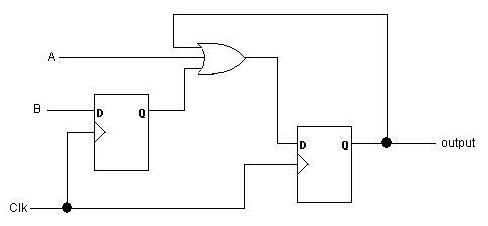
| A | B | Clk | Out |
| 0 | 0 | ↑ | |
| 0 | 1 | ↑ | |
| 0 | 0 | ↑ | |
| 0 | 0 | ↑ | |
| 1 | 1 | ↑ | |
| 0 | 0 | ↑ |

This version has 2 players plus Alex can reset the circuit.
The Problem: There are two buttons. The player that pushes their button first has their light set on and keeps the other light off. Any further button pushes and/or releases from either button are ignored. The light stays on until Alex resets them using his game master input (just run this to each flip-flops clear). To test your circuit, set the Ticks_Enabled under the Simulate menu.
Inputs: Button1, Button0
Outputs:
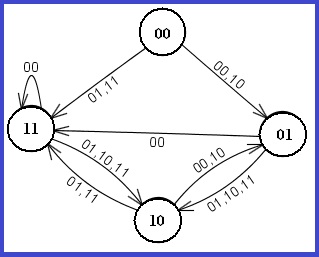
Turn in: The finite state diagram, next-state table, and a printout of the Logisim circuit.
- Light1 – turns on when Button1 is pushed before Button0
- Light0 – turns on when Button0 is pushed before Button1
Email the logisim file file to me. Make the name of the file is <your last name>.circ. For example, if I emailed the file it would be dowell.circ. If it doesn't have the correct filename, you don't get the points.
Instruction |
Clock |
Enable ALU Store |
Enable Register Store |
Register # Store |
Input (8
bits) |
Enable Input |
Register # to Bus |
Enable Register # to Bus |
Hex value(s) for the Instruction
|
| MOV R3, 15 |
↑ | ||||||||
| MOV R0, 240 |
↑ | ||||||||
| ADD R1, R0, R3 |
↑ | ||||||||
| (R1 = R0 + R3) |
↑ | ||||||||
| ↑ | |||||||||
| ↑ |
The top D flip-flop is R3, the bottom one is R0. If the value is don't care (xx), convert to zeros.
Once you've written down the values for each column, convert the 16 bits into a hex value.
3:30 pm - 5:30 pm