SSOL - Online Tools

for http://pearsonmylabandmastering.com

Prof Schmidt's Economic Courses

Website Links


Instruction Pages:


Prof. Schmidt's Home Page


SSOL - Online


F2F - Classroom


Resource Pages:


COURSE RESOURCES

COURSE POLICIES


There are SEVERAL TOOLS

AVAILABLE to YOU

while using Pearson Lab


FAMILIARIZE YOURSELF WITH THEM AND PLEASE USE THEM OFTEN


Learning Aids:

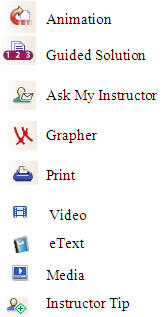
Often appear as icons on a side tool bar as exampled below.

Tool Bar Example:     Various Learning Aids:


Click "Ask My Instructor"

  • Send your instructor an email about the question on which you are working. The email includes:

  •     Your name

  •     The chapter on which you are working

  •     The number question you are working

  •     Your solutions thus far in the question

  •     Your typed note to the professor         stating your issue or difficulty

Click "Guided Solution"

  • To receive step-by-step guidance on how to solve the problem on which you are working. It is similar to a virtual tutor. Sometimes you must enter an answer in order to receive the next set of hints, instructions, or concept explanation.


Click "eText"

  • Opens the online textbook to the page that deals with the type of question on which you are working.

Click "Grapher"

  • Launches a blank graph allowing you to draw graphs to help you work out the answers to the question

Click "Video"

  • Launches a Video clip that demonstrates how to solve a question like the one you are working on

Click "Print"

  • Allows you to print the current question for future reference


Professor Schmidt's Home Page


micro

macro