TECHPRAC 03

MINF3650


Return to MINF3650 Homepage


WEBSITE LINKS


Professor Schmidt Homepage


***


Course Policies


Course Resources


Online Resources


***


Professor Schmidt Contact Information


Personal Happenings


Various Links


Download Word File


MINF3650 TechPrac03

Access to Microsoft Project software will be needed for this assignment. This software is available in Hull College campus labs E126 and N132 but students with Windows capable computers can download and install a free copy by visiting our MSDNAA Software page. You will need to email the instructor for a product key if you install your own software.

(15 pts) Create a bare bones project in Microsoft Project

  1. Review the Project Manger 101 Lesson 1 video walk through (and supporting PowerPoint if you want) which describe the mechanics for completing this assignment.
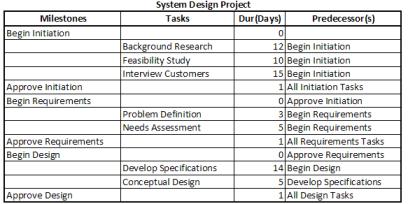
  2. Use PM to schedule the following project
    Screen Capture
    but make the following adjustments:
    1. The project start date will be 1 day after your next birthday.
    2. The Needs Assessment will require a number of days equal to 6 plus the last digit of your 927 number.
    3. The manager has concluded that Interview Customers cannot begin until the Background Research is complete.
  3. Save your project file as Proj01.mpp and submit it through you online lab. In the text portion of your submission area enter your start and end dates for your project.

(10 pts) Enhance a project's calendar & investigate critical path concepts

  1. Review the Project Manger 101 Lesson 2 video walk through (and supporting PowerPoint if you want) which describe the mechanics for completing this assignment.
  2. This exercise builds upon your project created in the previous exercise -- as adjusted in items 2.1 thru 2.3 -- so you can work with that file (I suggest opening and saving this as Proj02.mpp before starting to preserve the original copy).
  3. Implement the following calendar changes in your project:
    1. Your project team will only be available to you on Monday thru Wednesday each week but for the default 8 hours per day of 8 am to noon and 1 pm to 5 pm.
    2. Your project team receives training on the 1st and 3rd Monday of every month for next 12 months; they will be unavailable to participate in your project on training days.
  4. In the text portion of your submission, list each task (milestones are not necessary) and identify whether the task is on a critical path and, if not, what slack is available for the task. Adjust your project task sheet in the Proj02.mpp file to show the free slack for each task (and milestone).
  5. Save your project file -- revised as outlined above --  as Proj02.mpp and submit it through your online lab. In the text portion of your submission area enter your start and end dates for your project.

(25 pts) Create your own relevant project.

Develop a project plan that reflects what courses you need to finish before you complete your degree at GRU. Each task will be a course you are taking or need to take (e.g., MINF3650) which lasts 4 months (not entirely accurate but close enough). Use a start date of Jan 1 for Spring courses (e.g., Jan 1, 2013 for the courses you are taking now), May 1 for Summer courses, and Sep 1 for Fall courses (again, not entirely accurate but close enough). Precedence tasks for a course would be any prerequisites for the course (e.g. see the University Catalog has all courses & prerequisites) but you can set the start date for a course when you plan to take it. The resulting project Gantt chart will be a graphic of what you need to complete to finish.

Save your project file as Proj03.mpp and submit it through your online lab.


Submit THREE project files to the correct submission area in the online lab.